University Clearance Processing (Onsite)
Image
OFFICE OF STUDENT AFFAIRS
University Clearance Process (Onsite)
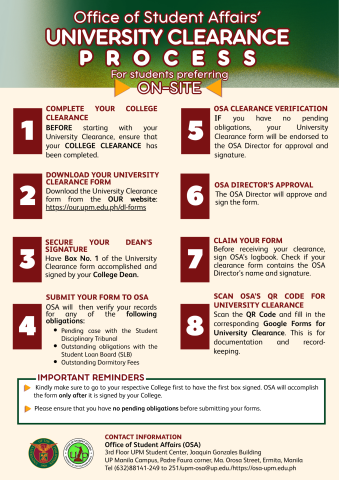
- COMPLETE YOUR COLLEGE CLEARANCE
- BEFORE starting with your University Clearance, ensure that your COLLEGE CLEARANCE has been completed.
- DOWNLOAD YOUR UNIVERSITY CLEARANCE FORM
- Download the University Clearance Form from the OUR website: https://our.upm.edu.ph/dl-forms
- SECURE YOUR DEAN’S SIGNATURE
- Have Box No. 1 of the University Clearance Form accomplished and signed by your College Dean.
- SUBMIT YOUR FORM TO OSA
- OSA will then verify your records for any of the following obligations:
- Pending case with the Student Disciplinary Tribunal
- Outstanding obligations with the Student Loan Board (SLB)
- Outstanding Dormitory Fees
- OSA will then verify your records for any of the following obligations:
- OSA CLEARANCE VERIFICATION
- IF you have no pending obligations, your University Clearance form will be endorsed to the OSA Director for approval and signature.
- OSA DIRECTOR’S APPROVAL
- The OSA Director will approve and sign the form.
- CLAIM YOUR FORM
- Before receiving your clearance, sign OSA’s logbook. Check if your clearance form contains the OSA Director’s name and signature.
- SCAN OSA’S QR CODE FOR UNIVERSITY CLEARANCE
- Scan the QR Code and fill in the corresponding Google Forms for University Clearance. This is for documentation and recordkeeping.
IMPORTANT REMINDERS:
- Kindly make sure to go to your respective College first to have the first box signed. OSA will accomplish the form only after it is signed by your College.
- Please ensure that you have no pending obligations before submitting your forms.
CONTACT INFORMATION
Office of Student Affairs (OSA) 3rd Floor UPM Student Center, Joaquin Gonzales Building
UP Manila Campus, Padre Faura corner, Ma. Orosa Street, Ermita, Manila
Tel (632)88141-249 to 251/upm-osa@up.edu./https://osa-upm.edu.ph